How I Made Ingestion 16x Faster and Cut My AWS Bill in Half
A lever-by-lever teardown of the Content Raptor re-architecture: hash-partitioned Postgres, right-sized Lambda concurrency, and the availability tradeoff I decided was worth it.

For three years I built and ran Content Raptor, a B2B SaaS doing SEO (search engine optimization) and content intelligence for 300+ paying customers. I was the only engineer and the only person on call. I wrote the code and I paid the AWS bill, which is the fastest way I know of to start caring about architecture.
The core workload was ingesting more than 3 million Google Search Console rows a day. The system around it: 14 Lambdas plus a separate Python service for natural language processing, Multi-AZ Aurora Postgres, all of it defined in Serverless Framework.
The first version of the pipeline worked. Data landed, customers got their dashboards. It was also slow, and the bill was about twice what it needed to be. The re-architecture I'm walking through here made ingestion 16x faster and cut the AWS bill roughly in half. The data volume didn't change and neither did the managed services. What changed was where the work happened and how much of it was wasted.
At a glance:
| Lever | What it bought |
|---|---|
| Hash partitioning (40 to 100 partitions per big table) + query-path rewrites | Most of the 16x |
| Reserved concurrency sized per worker (15 / 5 / 1) | No stampedes, capped spend |
| Provisioned concurrency on the API (2 warm) | No cold starts on the paid path |
ReportBatchItemFailures + error classification | Stopped paying to reprocess work |
| Single NAT gateway | Lower bill + one whitelistable IP |
The system, for reference (full writeup in the case study):
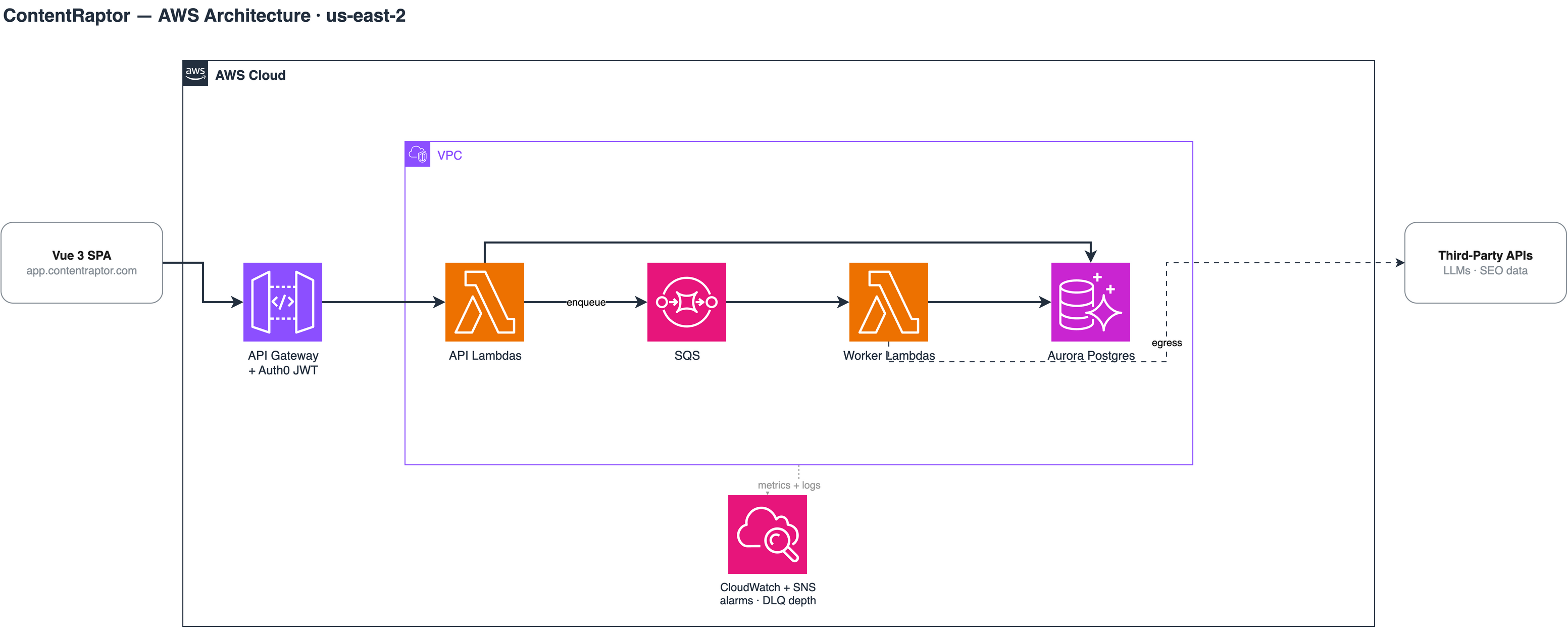
Hash partitioning carried most of the 16x
Search Console tables grow by millions of rows a day. Past a certain size, a big Postgres table starts fighting you. Writes contend on the same heap and index pages. Vacuum falls behind. Scans grind, because there's exactly one table to scan and it's enormous.
I hash-partitioned every large table, 40 to 100 partitions each depending on the table. The shape of it:
-- Sketch, not the production schema
CREATE TABLE gsc_query_page (
  site_id bigint NOT NULL,
  -- ...
) PARTITION BY HASH (site_id);

CREATE TABLE gsc_query_page_p0
  PARTITION OF gsc_query_page
  FOR VALUES WITH (MODULUS 64, REMAINDER 0);
-- ...repeat for the other 63
Writes spread across partitions instead of hammering one set of pages. Postgres can also scan partitions in parallel, so reads that used to crawl through one giant table fan out across many small ones.
Partitioning has a reputation as something you do later, when you're "big enough." With 3M rows a day landing, later was two years ago. The migration isn't free (you're rebuilding tables and every index that goes with them), but nothing else in this project came close to its payoff.
The query paths had to change too
Partitioning only pays when the queries cooperate. A partitioned table with queries that ignore the partition scheme gives you the old performance plus more catalog entries.
So the hot paths got rewritten alongside the migration: the ingestion writes and the heaviest reads behind the product. The work was a loop: read the EXPLAIN plan, find the scan that shouldn't be there, restructure, read the plan again. Repeat for every query that kept showing up slow.
I can't split the 16x cleanly between partitioning and the rewrites. They shipped together and they compound. But if you only have appetite for one change, take this pair.
Reserved concurrency, sized per worker
Ten workers fed by SQS, Amazon's queue service, and they had almost nothing in common. The Playwright screenshot job is heavyweight but happy to run in parallel. AI generation is slow, mostly waiting on upstream rate limits. And bulk imports must never run twice at once. Treat them all the same and one hot queue can starve the rest while a burst flattens your database.
Each worker got reserved concurrency sized to its job profile:
- 15 for the Playwright screenshot worker
- 5 for AI generation
- 1 for singleton imports that must not overlap
Nothing can stampede Aurora now, because the worst case for concurrent connections is a number I picked instead of a number SQS picked for me. No single queue can eat the account's Lambda concurrency and crowd out the API either.
It also caps spend: a runaway producer can fill a queue, but it can't fan out to a thousand concurrent Lambdas while it does.
Two warm instances on the API
The prod API Lambda ran with provisioned concurrency of 2. Cold starts don't matter on background workers; nobody is watching a queue. On the request path they're the product feeling broken to a paying customer.
Two warm instances covered the steady state, and anything above that fell back to normal on-demand scaling. A small fixed cost for a floor on responsiveness. Cheap insurance.
Failure handling paid for itself
The whole pipeline is SQS fan-out, and every worker uses ReportBatchItemFailures. Without it, the default Lambda-plus-SQS behavior is brutal: one bad message in a batch of ten fails the batch, all ten go back on the queue, and nine get reprocessed for nothing. With it, the handler returns only the actual failures:
// Sketch of the handler's return shape
return {
  batchItemFailures: failedIds.map((id) => ({ itemIdentifier: id })),
};
At 3M+ rows a day, "reprocess nine for nothing" is real money and real latency.
The other half is error classification. Every worker sorts failures into transient or permanent. Transient (a rate limit, a timeout) goes back on the queue and retries. Permanent (malformed input, a resource that no longer exists) goes straight to a dead-letter queue, the DLQ. No retries, no exponential-backoff theater for a message that can never succeed.
Poison pills are why this matters. A permanently broken message that keeps retrying clogs the queue and burns compute on every lap. Moving it to a DLQ ends that. Depth alarms on the DLQs are the other half: quarantine only helps if a human finds out it's filling up.
I filed this work under reliability at the time. It's also a cost lever. Every pointless retry is compute you pay for twice.
One NAT gateway, on purpose
Standard advice is a NAT (network address translation) gateway per Availability Zone, or AZ. I ran one for the whole VPC.
Two reasons. NAT gateways are a silent line item on serverless bills: an hourly charge per gateway plus data processing, multiplied by however many AZs you put them in. And a single gateway means a single fixed egress IP, which I needed anyway. DataForSEO and Google Search Console integrations involved IP whitelisting, and one stable IP is far easier to manage than a set that changes per AZ.
The tradeoff is real. If that AZ has a bad day, outbound traffic from the workers is down until it recovers. I accepted that. The workload is queue-driven, so SQS holds the messages and ingestion resumes when egress does. Customers would see slightly stale data, not an outage. For a synchronous, latency-sensitive system I'd make the opposite call. For this one, a single NAT was the right amount of availability.
An aside on CI
Same habit, different bill. Consolidating CI (continuous integration) jobs and adding path-based filtering (don't run the full pipeline when only docs changed) cut billed CI minutes by about 60%. Not AWS, but the mindset transfers: most pipelines run work nobody asked for.
The order of operations, if you're doing this yourself
Start with the data layer, because that's usually where both the latency and the bill hide. Partitioning plus query rewrites moved the most for me, by a wide margin. Concurrency tuning came second and was mostly about turning unbounded behavior into chosen numbers. The failure-handling work looked like polish when I started it. It wasn't.
And measure before and after each lever, not just at the end. The 16x and the halved bill are honest numbers, but they're only meaningful because I knew what the system did before I touched it.
I now do this kind of work for other teams. If your AWS bill has grown faster than your traffic, I run fixed-price AWS cost audits. There's a sample report if you want to see exactly what you'd get, and the full Content Raptor architecture writeup is in the case study.

About the author
Zak Kann helps SMBs cut costs and ship faster with AI automation, data pipelines, and internal tools.